Webflow to Next.js Migration: The Complete 2026 Guide (Why, How, Costs & Services)
How to migrate from Webflow to Next.js in 2026: why teams switch, a step-by-step process, real cost ranges, and how to choose a migration partner.
Published •24 min read
Migrating from Webflow to Next.js means rebuilding your Webflow-designed site as a React codebase you fully control. In TechnologyChecker's July 2026 crawl, 988 domains dropped Webflow for Next.js against just 95 moving the other way. This guide covers why teams switch, the step-by-step process, real cost ranges, and how to pick a migration partner.
I'm David, CTO at TechnologyChecker. My team runs the detection engine that scans over 50 million domains every month, so the numbers in this post aren't scraped from other blogs. They come from our own crawl. That gives me a rare vantage point on this specific move: I can see how many sites are actually making it, who they are, and where they end up.
Why Teams Migrate from Webflow to Next.js in 2026

Teams move from Webflow to Next.js for four reasons: performance ceilings, SEO control, cost at scale, and developer ownership. Webflow is excellent for launching a marketing site fast without engineers. Once a site grows past that stage, the visual builder starts to constrain what the team can ship, and a React framework like Next.js removes the ceiling.
Performance and Core Web Vitals
The performance argument is concrete. Site speed maps directly to revenue. According to Deloitte's "Milliseconds Make Millions" study, a 0.1-second improvement in mobile load time lifted retail conversions by 8.4% and average order value by 9.2%. Next.js gives you server-side rendering, static generation, and automatic image optimization out of the box, which is why so many teams reach for it when Core Web Vitals become a priority. Google documents the exact thresholds you're aiming for in its Core Web Vitals reference: LCP under 2.5s, INP under 200ms, CLS under 0.1.
SEO control at scale
Is Webflow good for SEO? Yes, for a standard marketing site. It renders real HTML, handles meta tags, and generates a sitemap. The limits show up at the edges: fine-grained control over rendering strategy, programmatic pages at scale, custom redirect logic, and structured data beyond the built-in fields. When those edges start to matter, "Webflow alternatives" becomes a real search, and Next.js is the most common destination for engineering-led teams.
Cost at scale
The cost angle is real but easy to oversimplify. Webflow bills a predictable monthly subscription. Next.js trades that subscription for engineering time plus hosting, and hosting on a platform like Vercel often starts free for small sites. Whether that saves money depends entirely on your team. We'll put real ranges on it further down.
Developer ownership and control
Ownership is the deeper reason teams commit to the move. On Webflow you work inside the builder's model: its hosting, its interactions engine, its export format. On Next.js the codebase is yours, so you pick the CMS, the component library, the deployment target, and the test setup, and you can wire the site into the rest of your stack. For engineering-led teams that control is the point, and it's hard to buy back once a site has outgrown a visual builder.
Webflow vs Next.js: An Honest Comparison
Webflow and Next.js solve different problems. Webflow is a visual builder where designers ship marketing sites without touching code. Next.js is a React framework where developers build anything, with full control and full responsibility. Neither is "better." They serve different owners and different stages. You can see it in who runs each: Webflow powers marketing and brand sites for organizations like TED, the Bill & Melinda Gates Foundation, and Bobcat, and the broader list of companies using Webflow leans toward marketing, education, and brand teams rather than engineering-led products.
Here's the honest side-by-side:
| Dimension | Webflow | Next.js |
|---|---|---|
| What it is | Visual builder (low-code) | React framework (code) |
| Hosting | Managed by Webflow | Self-managed (Vercel, Netlify, your own infra) |
| CMS | Built-in visual CMS | Bring your own headless CMS (Sanity, Contentful, Payload) |
| SEO control | Strong defaults, capped at platform limits | Full control: SSR/SSG, metadata, redirects, schema |
| Animations | Native Webflow Interactions (IX) | Code libraries (GSAP, Motion) |
| Dev workflow | Visual canvas, designer-led | Git, code review, CI/CD |
| Cost model | Monthly subscription (seats + hosting tier) | Dev time upfront + hosting (often low or free) |
| Who edits content | Anyone, visually | Editors need a headless CMS layer |
| Best for | Marketing sites, landing pages, fast publishing | Web apps, custom logic, performance at scale |
The trade-off underneath the table is who owns the site. When marketing owns it and needs same-day publishing without filing an engineering ticket, Webflow wins. When engineering owns it and the brand needs interaction logic or performance tuning a visual builder can't reach, Next.js wins. Most migrations happen when ownership shifts from the first situation to the second. The choice isn't Webflow versus Next.js in the abstract. It's whether your marketing team can afford to wait on developers, or your developers can afford to work inside a visual builder's limits.
Be fair to Webflow here. For a five-page marketing site that a two-person startup needs live next week, rebuilding in Next.js is usually the wrong call. The migration pays off when the site has grown into something the visual builder is actively slowing down. One more caveat if you sell online: Webflow's ecommerce tier carries its own constraints on checkout and catalog logic, and you can see Webflow ecommerce adoption data to gauge how common that setup still is before you plan around it.
What the Data Shows: Webflow Churn and Next.js Adoption
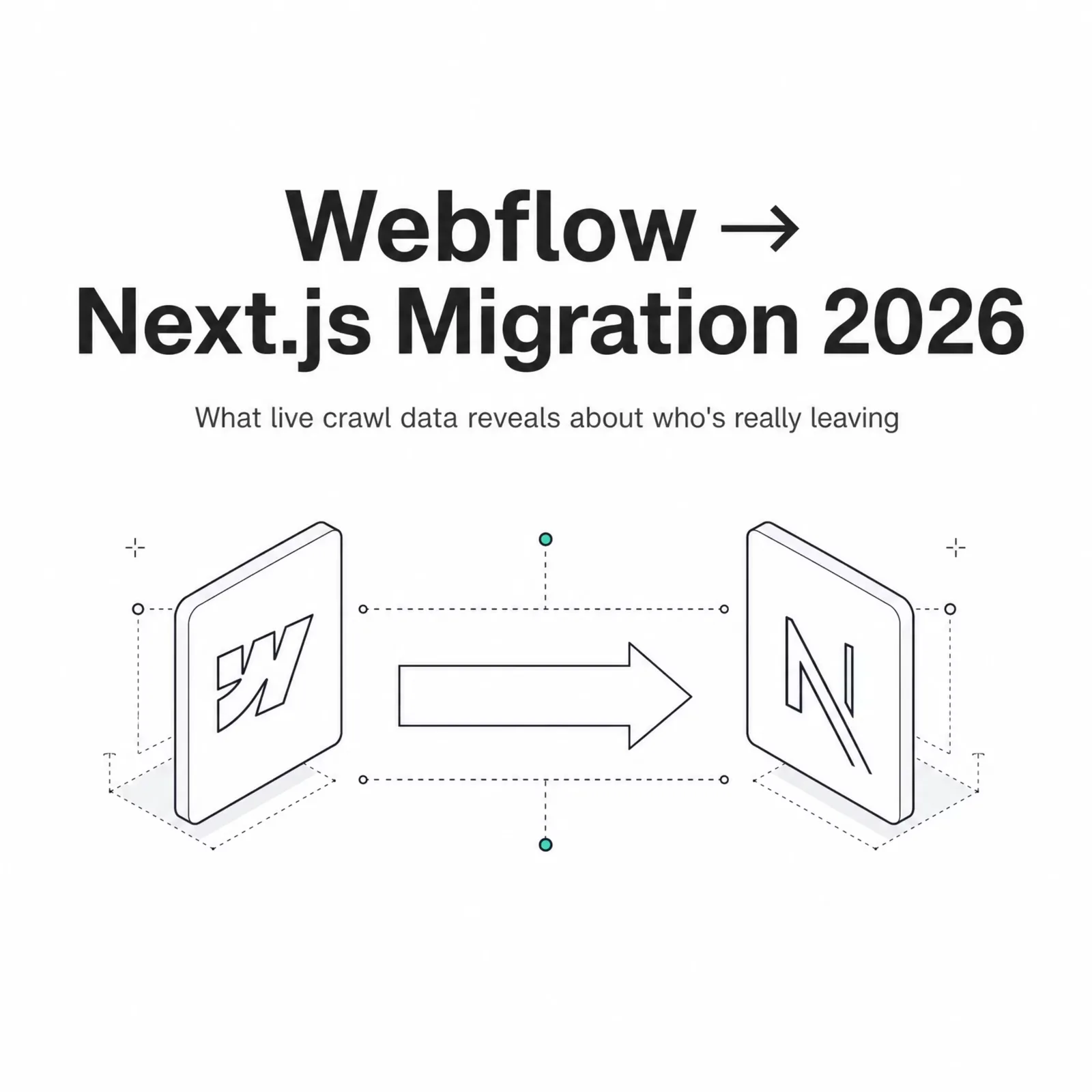
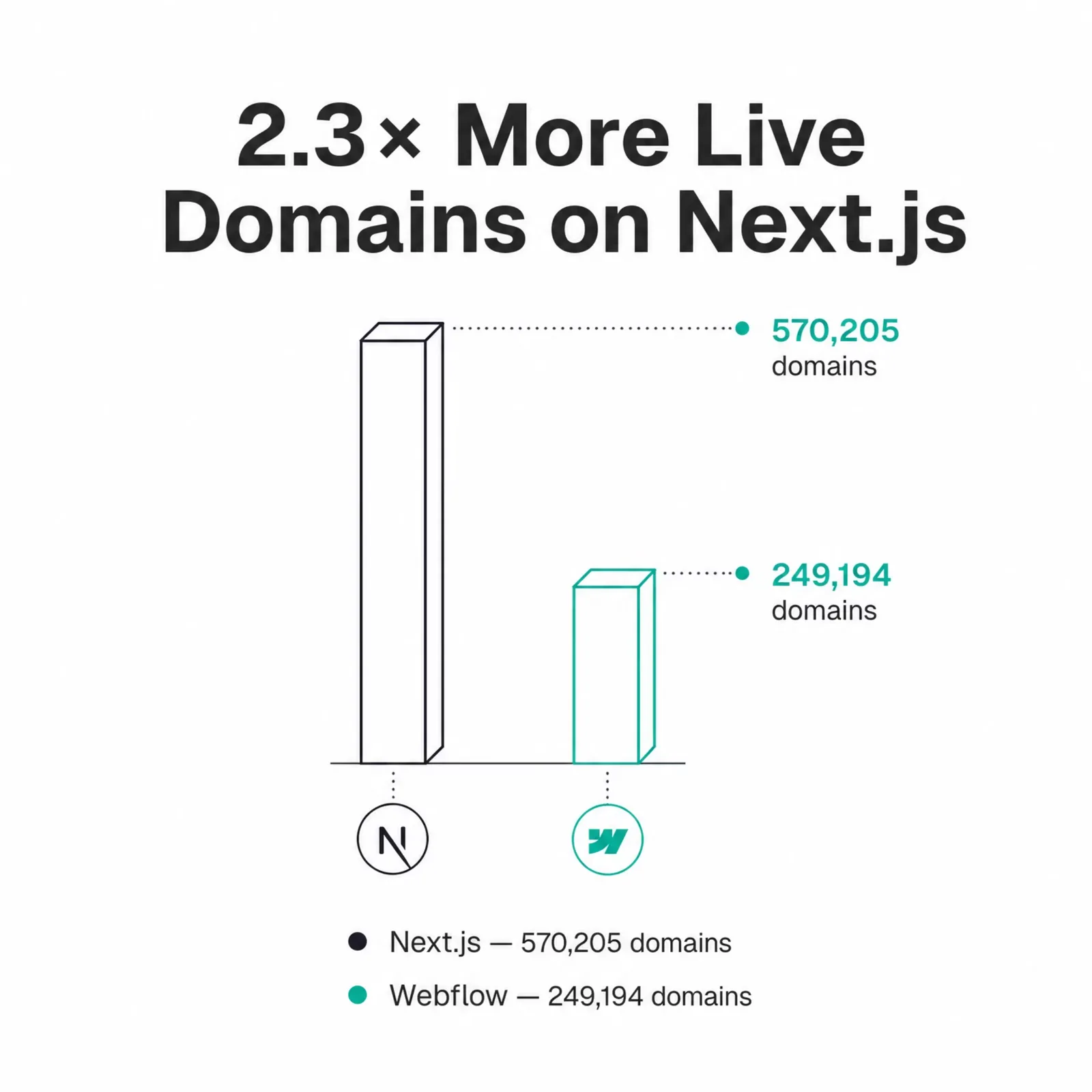
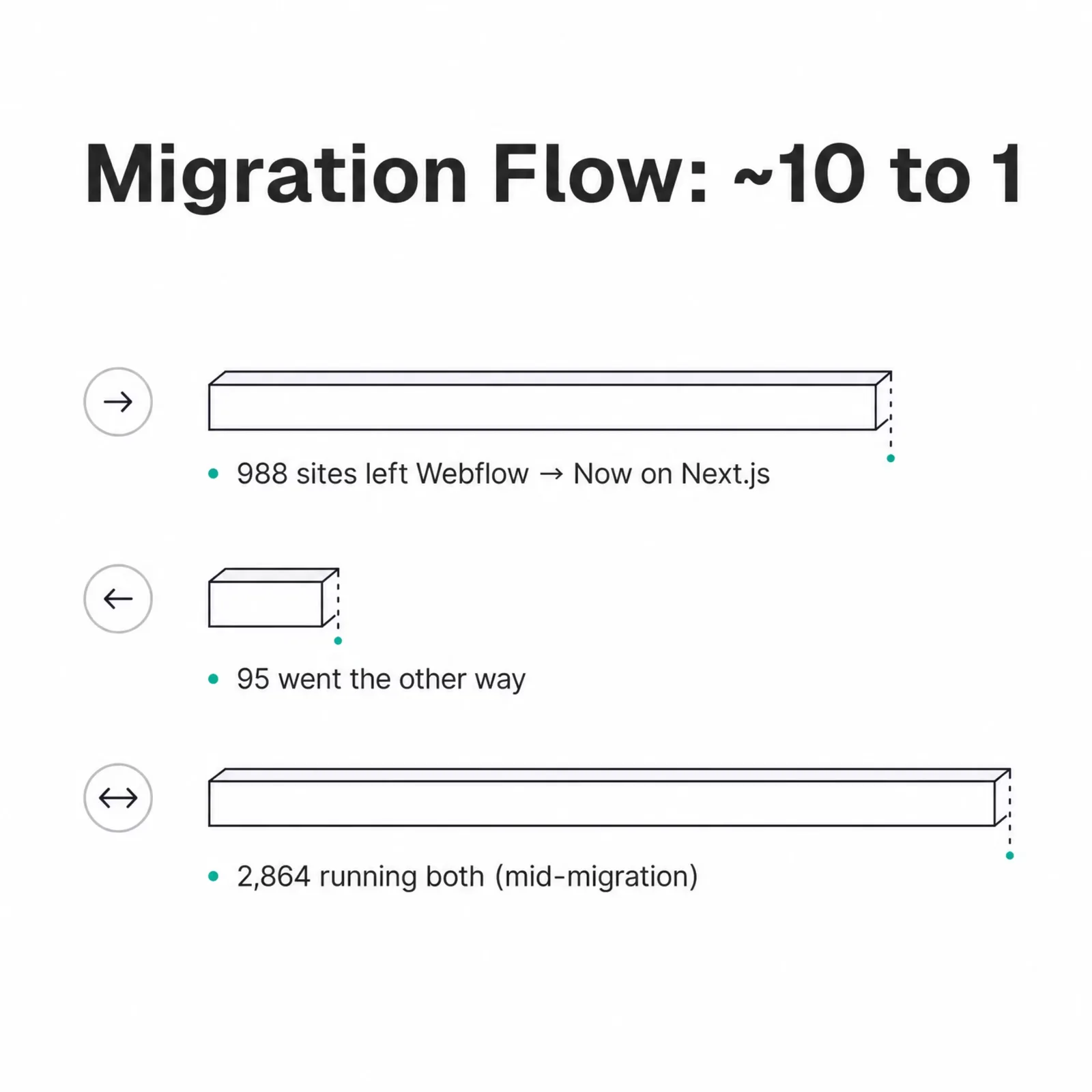
The migration flow runs about 10 to 1 toward Next.js. Our live crawl recorded 988 domains that dropped Webflow and now run Next.js, against just 95 that moved the other way. This is the part no competitor guide has, because it comes from watching real sites change stacks rather than repeating vendor talking points. We track the same switching signal across platforms: our Shopify migration data shows Shopify winning stores about 3 to 1, so a 10-to-1 flow away from Webflow is unusually lopsided.
A note on how we measured it, so you can weigh the numbers honestly. Our v2 detection crawler has been live since 2026-05-29, so the migration counts below reflect a recent window of roughly five weeks, not all-time history. We deduplicate each domain's state with argMax(status, updated_at) across the v2 Crawlee cluster, and we join company firmographics from LinkedIn. "Dropped Webflow, now on Next.js" means Webflow is no longer active on any subdomain and Next.js is currently live.
Here's the live adoption and the migration flow in one place:
| Signal (TechnologyChecker v2 crawl, July 2026) | Count |
|---|---|
| Webflow — active domains | 249,194 |
| Next.js — active domains | 570,205 |
| Dropped Webflow, now on Next.js | 988 |
| Dropped Next.js, now on Webflow | 95 |
| Running both at once (hybrid) | 2,864 |
Even inside a five-week window, Webflow lost about ten times more sites to Next.js than it won back. That's a directional signal, not statistical noise. And the 2,864 domains running both at once matter just as much as the clean switchers, because they show a hybrid pattern that most guides ignore. More on that in the challenges section.
Now the firmographics, which is where the two tools reveal different buyers:
| Dimension | Webflow | Next.js |
|---|---|---|
| Micro companies (1–10 employees) | 61.1% | 61.2% |
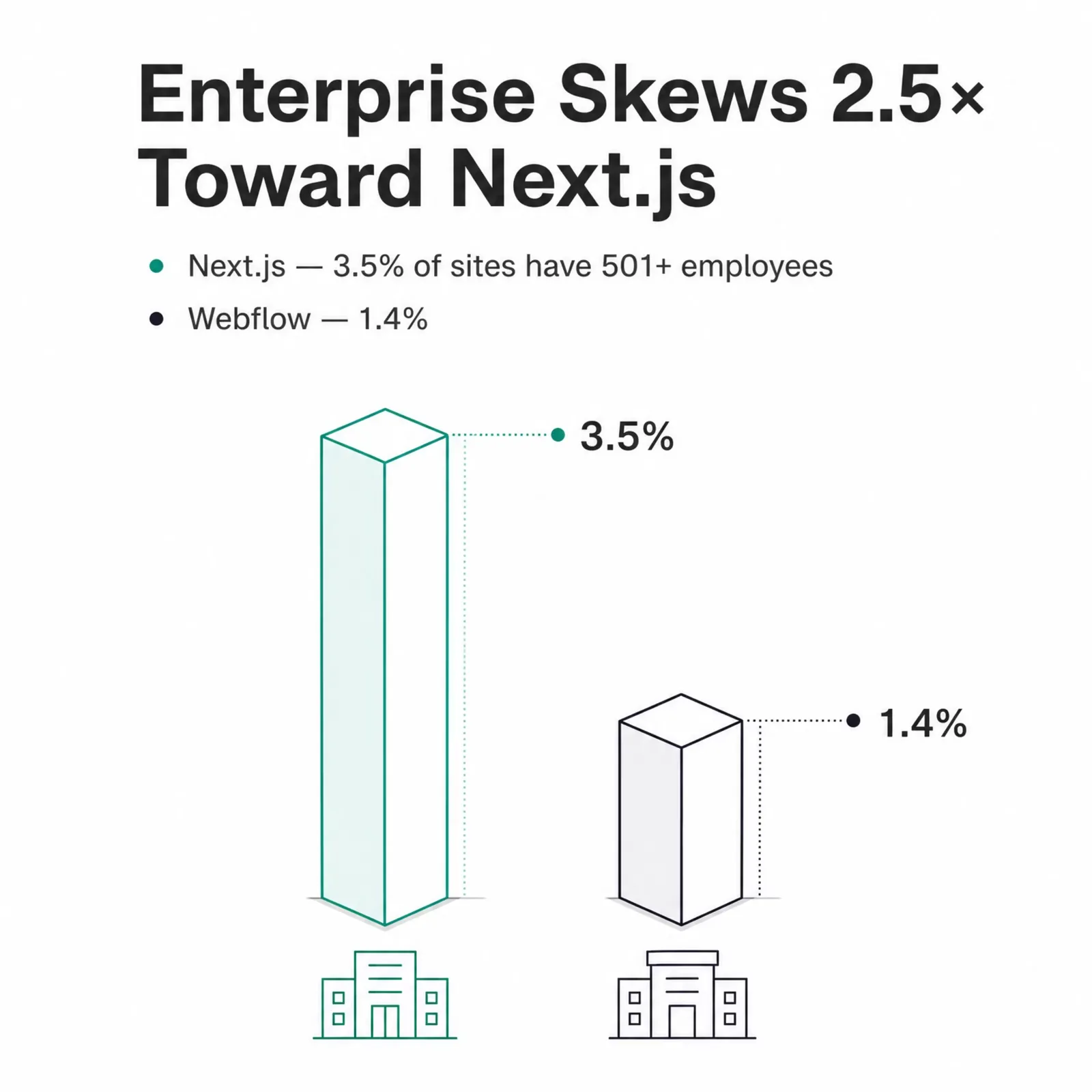
| Enterprise (501+ employees) | 1.4% | 3.5% |
| Mid-market and up (201+ employees) | 3.5% | 6.7% |
| Top industry | Software Development (6.8%) | Software Development (9.5%) |
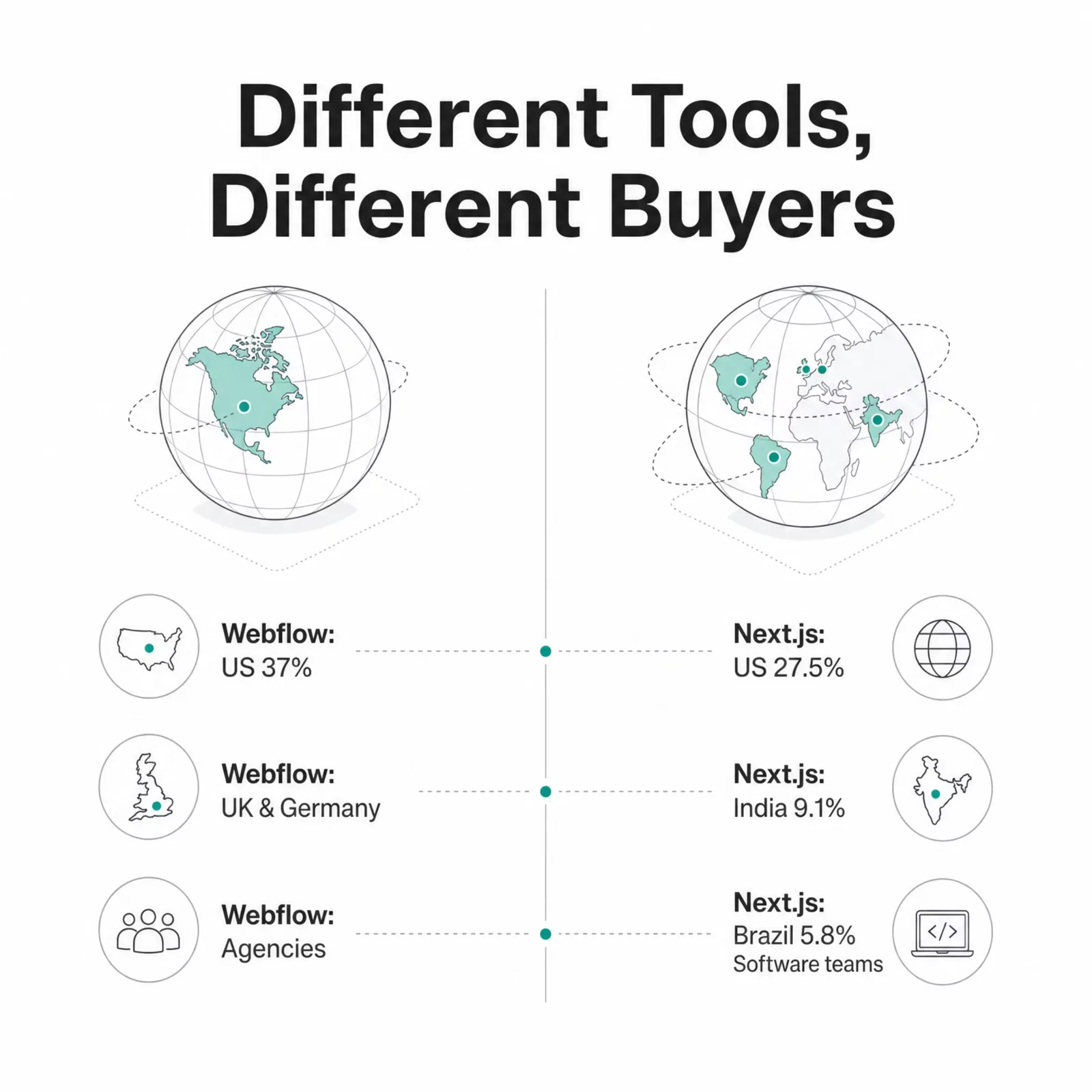
| #1 country | United States (37.0%) | United States (27.5%) |
| Standout markets | UK, Germany, Canada | India (9.1%), Brazil (5.8%) |
Both platforms skew heavily toward tiny companies, but the tail tells the story. Next.js carries roughly 2.5x Webflow's share of 501-plus-employee companies (3.5% vs 1.4%). Larger, scaling teams over-index on the framework. The enterprises we detect running Next.js include Amazon, IBM, JP Morgan Chase, and Marriott, and you can browse the full list of companies using Next.js any time.
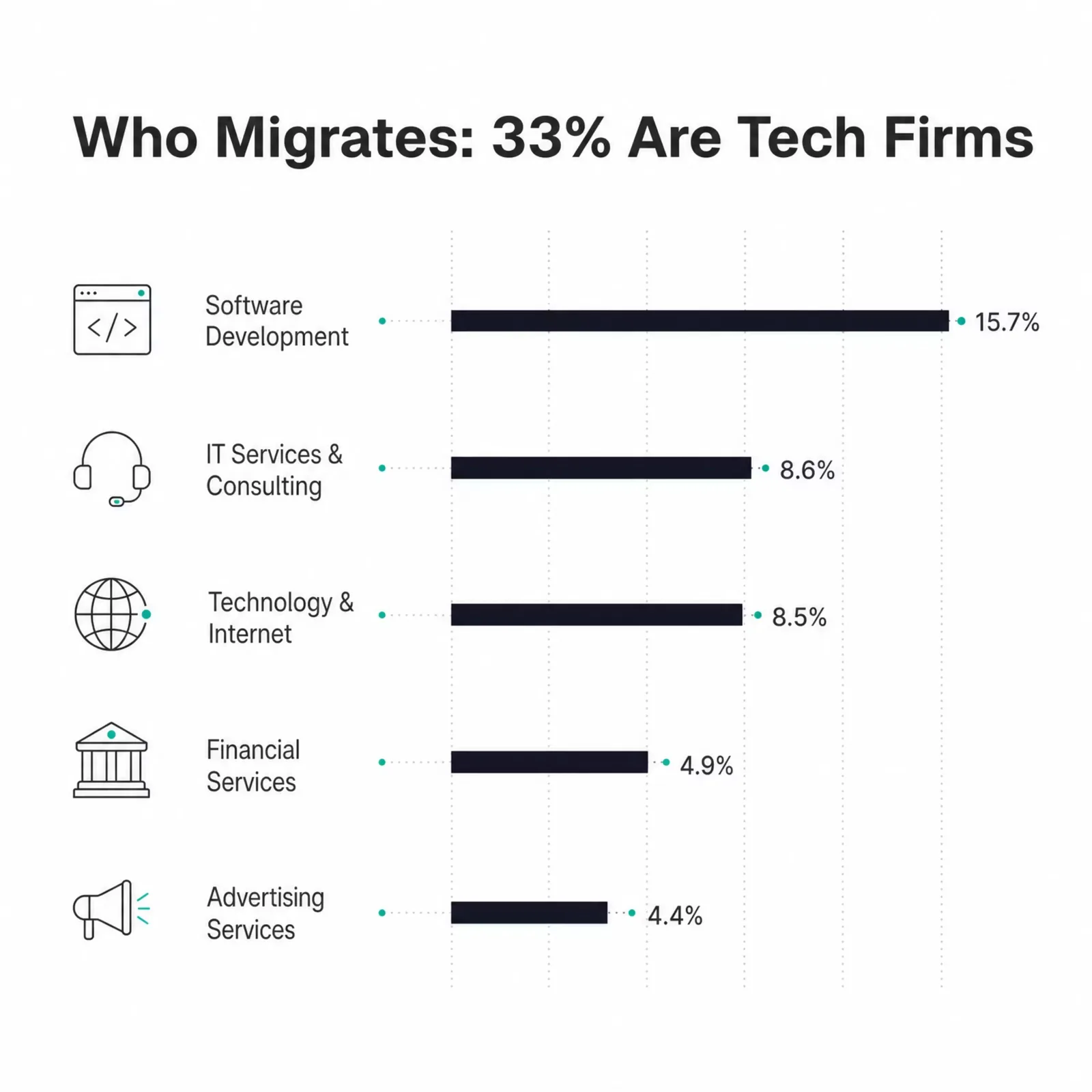
Who's actually making the move? Among the 988 domains that migrated, tech-forward companies lead. Software Development (15.7%), IT Services (8.6%), and Technology/Internet (8.5%) together make up 32.8% of all Webflow-to-Next.js migrators. Agencies are the next cluster, with advertising, marketing, and design shops adding another 10%.
One geographic wrinkle worth noting: Webflow adoption is far more US-centric (37% of sites with company data) than Next.js (27.5%), which is more globally spread, with India and Brazil among its top four markets. That maps to the buyers. Webflow's base is American agencies and studios building client sites. Next.js reaches a worldwide developer community.
How to Migrate from Webflow to Next.js (Step by Step)

Here's how to convert a Webflow site to Next.js in six steps. Audit and export, scaffold the Next.js project, install your tooling, rebuild components in React, wire up content, then optimize and deploy. The whole process takes anywhere from a few days to several weeks depending on which method you pick.
- Audit your Webflow site and export assets. Inventory every page, interaction, and CMS collection before you touch code.
- Set up a new Next.js project with the App Router. Start from a clean, typed foundation.
- Install dependencies. DevLink, a styling approach, and any animation or CMS libraries.
- Convert components to React, adding the
use clientdirective wherever there's interactivity. - Wire up content via the Webflow Data API or a headless CMS.
- Optimize, add 301 redirects, and deploy to Vercel or your host of choice.
Let's expand the steps that actually trip people up.
Scaffold the project. Create the app with the App Router and TypeScript from the first command:
npx create-next-app@latest my-site --app --typescript --tailwind
cd my-site
The App Router is the current default. If you're new to its rendering model, the Next.js App Router documentation is the reference to keep open. The mental shift from Webflow is that components render on the server by default, and you opt into client-side behavior only where you need it.
Convert components and mark interactivity. This is the single most common source of migration bugs. Webflow interactions (hover states, scroll animations, tab logic) all rely on client-side JavaScript. In Next.js, any component that uses state, effects, or browser APIs must carry the use client directive at the top of the file. Everything else stays a server component so it renders fast. Here's a minimal client component wrapping a converted hero:
"use client"

import { useState } from "react"

export function Hero({ heading }: { heading: string }) {
  const [open, setOpen] = useState(false)
  return (
    <section className="hero">
      <h1>{heading}</h1>
      <button onClick={() => setOpen(!open)}>
        {open ? "Hide details" : "Show details"}
      </button>
    </section>
  )
}
Forget the directive and you'll hit an error like You're importing a component that needs useState. This React Hook only works in a Client Component. It's a fast fix once you know the pattern. The rule of thumb: push use client as far down the tree as you can, so the interactive leaf is a client component but the page around it stays on the server. React Server Components are what make the migrated site fast, so you don't want to opt the whole page out of them.
"use client" islands for anything interactive. Wrapping the whole app in "use client" works, but it throws away the performance you migrated for.Below the numbered list, there are three real methods to get from Webflow to Next.js. Pick based on how much of your existing visual work you want to reuse.
| Method | How it works | Best for |
|---|---|---|
| DevLink export | Webflow's official tool exports the components you designed on the canvas as React components. You import them into Next.js and wrap interactive ones in use client. Keeps your visual work instead of rebuilding it. |
Teams with strong Webflow visuals who want them inside a React app fast |
| Manual rebuild | Export the Webflow HTML/CSS/JS and rebuild each piece by hand as JSX with Tailwind or CSS modules. More work, but you get a clean codebase with no dependency on Webflow's export format. | A long-term re-architecture where you want full control of the markup |
| Hire a partner | A specialist developer or agency runs the whole job — code export, component rebuild, CMS wiring, redirects, and interactions — as one project. You trade budget for speed and skip the learning curve. | Teams without React capacity, or a business-critical site that can't absorb SEO risk |
Method 1: Webflow DevLink
DevLink is Webflow's official React component export. It turns components you designed on the Webflow canvas into React components you import into Next.js, which keeps your design work instead of rebuilding it by hand. For the App Router, you install the exported package and wrap your root layout in the provider:
// app/layout.tsx
import { DevLinkProvider } from "@/devlink/DevLinkProvider"
import "@/devlink/global.css"

export default function RootLayout({
  children,
}: {
  children: React.ReactNode
}) {
  return (
    <html lang="en">
      <body>
        <DevLinkProvider>{children}</DevLinkProvider>
      </body>
    </html>
  )
}
Webflow's docs are explicit that exported components may not run as server components, so interactive ones need "use client". The full setup, including swapping Webflow's Link and Image for the Next.js equivalents, is in Webflow's DevLink framework guides. DevLink is the fastest path when your Webflow visuals are strong and you mainly want them inside a React app.
Method 2: Manual code export and rebuild
The manual route means exporting your Webflow HTML/CSS/JS and rebuilding each piece as JSX with Tailwind or CSS modules. It's more work than DevLink, and it's the right choice when you want a clean re-architecture rather than a wrapper around Webflow's output. You get full control of the markup, no dependency on Webflow's export format, and a codebase that reads like it was written for Next.js from day one. Most teams doing a long-term rebuild land here.
Method 3: Hire a developer or migration expert
If you don't have React capacity in-house, the fastest route to a production-ready result is to hire someone who has done this before. A specialist Webflow-to-Next.js developer or agency handles the whole job as one project: the code export, the component rebuild, the CMS wiring, and the interaction and SEO work. You trade budget for speed and skip the learning curve. Vet candidates on real Webflow migration work, not general web development, and get their redirect and SEO plan in writing before they start. The section on choosing a migration partner below covers exactly what to ask. If you'd rather not go hunting, TechnologyChecker keeps a network of vetted developer partners who have shipped this exact migration — email migration@technologychecker.io and we'll introduce you to ones that fit your stack.
Migration Tools: DevLink, Code Export, and Headless CMS Options
Your tooling choice comes down to one question: does marketing still need a visual editor? DevLink and raw code export both move you into React, but neither gives non-technical editors a canvas. If your marketing team publishes without engineers today, you'll want a headless CMS so they keep that autonomy after the move.
| Approach | What it does | Keeps a visual editor? | Best for |
|---|---|---|---|
| DevLink | Exports Webflow components as React | No (design in Webflow, ship in React) | Reusing existing Webflow visuals |
| Raw code export | HTML/CSS/JS you rebuild in JSX | No | A clean re-architecture |
| Headless CMS | Content lives in a CMS; Next.js renders it | Yes | Teams where marketing edits independently |
You can also keep Webflow's content system and pull it into Next.js through the Webflow Data API. A server component fetches the collection at build or on a schedule:
// app/blog/page.tsx  (Server Component)
export default async function BlogIndex() {
  const res = await fetch(
    "https://api.webflow.com/v2/collections/COLLECTION_ID/items",
    {
      headers: { Authorization: `Bearer ${process.env.WEBFLOW_API_TOKEN}` },
      next: { revalidate: 3600 },
    },
  )
  const { items } = await res.json()

  return (
    <ul>
      {items.map((post: { id: string; fieldData: { name: string } }) => (
        <li key={post.id}>{post.fieldData.name}</li>
      ))}
    </ul>
  )
}
For a full break from Webflow, a Next.js CMS gives editors a home without the platform lock-in. Common options are Contentful, Sanity, and Payload. Sanity and Contentful are hosted, Payload is open source and self-hostable. All three plug into the App Router the same way: fetch content in a server component, render it, revalidate on a schedule. Which one fits depends on your team's appetite for hosting versus convenience.
How Much a Webflow to Next.js Migration Costs (and How Long It Takes)
A Webflow to Next.js migration costs either your team's time or an agency's fee, and it runs from a few days to a few months. There's no single price, because "migration" covers everything from a five-page brochure site to a hundred-page content platform with custom interactions. The honest framing: you trade Webflow's predictable subscription for developer time plus hosting.
Here are the ranges we see quoted in the market. These are industry estimates for planning, not figures from our detection data:
| Method | Typical cost | Timeline | Best for |
|---|---|---|---|
| DIY with DevLink | Your team's time | 1–4 weeks | In-house React developers |
| Manual rebuild | Dev time (internal or contract) | 3–8 weeks | A clean re-architecture |
| Agency or freelancer | ~$5,000–$50,000+ | 4–12 weeks | Teams without dev capacity |
Does the switch actually save money? Sometimes, and it depends on your team. One founder, Anita Kirkovska, posted that her team churned off Webflow and saved $30k a year after moving to Next.js plus a headless CMS. Take that as one data point, not a benchmark. It's a single company's result, the savings depend heavily on seat count and plan tier, and it excludes the upfront engineering cost. Your math could land anywhere.
The timeline follows the same logic as the cost. A small site with a developer already on the team can be live in a week. A content-heavy site that needs a headless CMS, careful redirect mapping, and rebuilt animations is a one-to-three-month project. Scope drives both numbers far more than the platform does.
Common Migration Challenges (and How to Avoid Them)

Most migration pain concentrates in four areas: animations, CSS and hydration, SEO preservation, and deciding whether to fully switch at all. None of them are blockers. Each has a known fix, and knowing them in advance is the difference between a one-week project and a one-month one.
Rebuilding Webflow interactions and animations
Webflow Interactions (IX) don't come along for free. They're generated by Webflow's runtime, so a code export won't reproduce them. Rebuild scroll and hover animations with a real animation library instead: GSAP for timeline-based sequences, or Motion (formerly Framer Motion) for React-native component animations. Map each Webflow interaction to its library equivalent before you start, so nothing gets silently dropped.
CSS conflicts and hydration errors
Two errors show up again and again. The first is CSS specificity clashing when Webflow's exported styles meet your own Tailwind or module classes; scope the imported CSS or migrate it deliberately rather than dumping the global stylesheet. The second is a hydration mismatch, where the server-rendered HTML differs from what the client renders, usually because a component reads window or Date during render without a use client boundary. Keep browser-only logic inside client components and the mismatches disappear.
Preserving SEO through the move
This is where a migration can genuinely hurt you if you rush it. Preserve your URL structure, or map every changed URL with a 301 redirect. Carry over titles, meta descriptions, and structured data. Regenerate the sitemap and resubmit it. Skip this and you can shed rankings that took years to earn.
The hybrid path (keep both on purpose)
Here's the option most guides skip. You don't have to choose all-or-nothing. Our crawl detects 2,864 domains running Webflow and Next.js at the same time. Some are mid-migration, but many are a deliberate split: Next.js for the product and app, Webflow for marketing pages the content team owns. This is a legitimate middle path. It lets engineering take the parts that need performance and custom logic while marketing keeps same-day publishing on the pages they run. If a full migration feels like too much at once, the hybrid is a real answer, not a compromise.
How to Choose a Webflow to Next.js Migration Partner

Choosing a migration partner comes down to proof, process, and honesty about scope. To be clear, TechnologyChecker doesn't run migrations in-house — we're a detection platform, so the advice below is buyer education, not a pitch for our own dev shop. What we do keep is a network of vetted developer partners we can introduce you to (more on that below). Whether you use a partner we match you with, hire your own agency or freelancer, or run it in-house, the same questions apply.
Start with whether you should hire out at all. If you have a React developer on staff, a small site is a DIY project. If you don't, or the site is large, an agency or experienced freelancer is worth the fee. The line usually sits at team capacity, not company size.
What to look for in a partner:
- A real portfolio of Webflow-to-React work, with live URLs you can inspect, not just screenshots.
- A written migration plan that names how they'll handle interactions, redirects, and the CMS before they quote.
- A redirect and SEO strategy stated up front, because that's where sloppy migrations cause lasting damage.
- Clear ownership of the code afterward, so you're not locked into the agency to make edits.
Questions worth asking on the first call: How do you preserve SEO through the move? Which animation library do you use to rebuild Webflow interactions? Will marketing be able to edit content without us, and how? Who owns and hosts the code when you're done?
Before you brief any partner, know your own stack. Our own move away from a hosted platform in years past taught me that the migrations that go smoothly are the ones where you inventory everything first: every interaction, every CMS collection, every third-party embed. Walk in with that list and every quote you get will be sharper.
Frequently Asked Questions
Is there a free Webflow to Next.js migration tool? There's no single free button that produces a finished site. The free path is DIY: export your Webflow code or use DevLink, then rebuild in Next.js yourself. Paid conversion tools speed up the mechanical translation, but you still need a developer to finish and deploy the result.
How long does migrating from Webflow to Next.js take? Anywhere from a few days to three months. A small marketing site with an available React developer can be live in about a week. A content-heavy site that needs a headless CMS, rebuilt animations, and careful redirect mapping is a one-to-three-month project. Scope drives the timeline far more than the platform.
What is Webflow DevLink for Next.js integration?
DevLink is Webflow's official feature for exporting components you designed on the Webflow canvas as React components. You install the package, wrap your root layout in DevLinkProvider, and import the components into Next.js. It keeps your visual design work instead of forcing a manual rebuild, though interactive components still need the use client directive.
How do you migrate Webflow to React? Next.js is a React framework, so the process is the same: export or convert your Webflow components, rebuild them as React with JSX, mark interactive pieces as client components, and connect your content through an API or CMS. Plain React without Next.js skips the server-rendering layer, which usually costs you SEO and performance.
Does migrating to Next.js help SEO? It can, if you do it carefully. Next.js gives you full control over rendering, metadata, redirects, and Core Web Vitals, which are all ranking inputs. The catch is that a careless migration with missing 301 redirects can hurt more than the speed gains help. Preserve URLs and redirects and the SEO upside is real.
Should you hire an expert to migrate from Webflow to Next.js? Hire out when you don't have React capacity in-house, or when the site is business-critical and can't absorb SEO or downtime risk. A specialist handles the export, rebuild, CMS wiring, redirects, and interactions as one project, which is faster and safer than learning on a live site. Do it yourself only if you have a confident React developer and time to spare.
Where can I find Webflow to Next.js code on GitHub? Search GitHub for "webflow nextjs" or "devlink nextjs" and you'll find starter repos and DevLink example projects. Webflow's own documentation also links reference setups. Treat community repos as learning material rather than drop-in solutions, since most are tuned to one project's structure, not yours.
Framer vs Next.js: which should you choose? Framer is a visual builder like Webflow, best for designer-led marketing sites that need polish without code. Next.js is a developer framework for custom apps and sites that need control. Choose Framer if design speed matters most; choose Next.js if engineering owns the site. You can browse companies using Framer to see the adoption pattern.
If the real choice is Webflow or Framer rather than either against Next.js, the movement between them is one-sided: 391 domains left Webflow for Framer in the 90 days to September 7, 2026 against 108 going back, and only 177 run both. Webflow vs Framer: who is switching sets that against pricing and the CMS limits on each side.
Should SaaS companies hire experts for a Webflow to Next.js migration? If you have React developers in-house and the site is small, do it yourself. If you lack developer capacity or the site is large with complex interactions, hiring an experienced agency or freelancer usually saves money over a stalled internal attempt. The decision hinges on capacity, not company size.
Can you keep Webflow and Next.js together? Yes, and thousands of sites do. Our crawl detects 2,864 domains running both at once. The common split is Next.js for the product or app and Webflow for marketing pages the content team edits directly. It's a legitimate hybrid, not a failed migration, and it's often the right first step.
Plan Your Migration with Real Data
The best migration starts with an honest inventory of what you're actually running. Before you brief a partner or write a line of code, audit your current stack: what Webflow features you depend on, what third-party tools are embedded, and what any target framework really runs under the hood.
That's what our detection engine is built for. Use TechnologyChecker's technology lookup to see exactly what a site is built with, browse live Next.js adoption data, or read how our crawler works in our guide to technology detection methods. If you're weighing a bigger platform decision, our breakdown of why SaaS companies switch tools covers the same trade-offs from a different angle. We don't run migrations ourselves — we give you the data to plan one well, and if you'd like a developer who has done it before, email migration@technologychecker.io and we'll introduce you to a vetted partner.

CTO
15+ years of experience
David is the CTO of TechnologyChecker, responsible for the engineering and architecture behind the platform's crawling infrastructure.
- MEng Computer Science, University of Edinburgh
- AWS Solutions Architect Professional
- Contributor, Open Source Crawling Frameworks
Never miss our research