

Prerequisites
Before building a lead list, make sure you have:- A TechnologyChecker account (sign up free)
- An organization API key (create one in Settings > Developers — see authentication)
- Sufficient credits for the requested list size
How to build a lead list
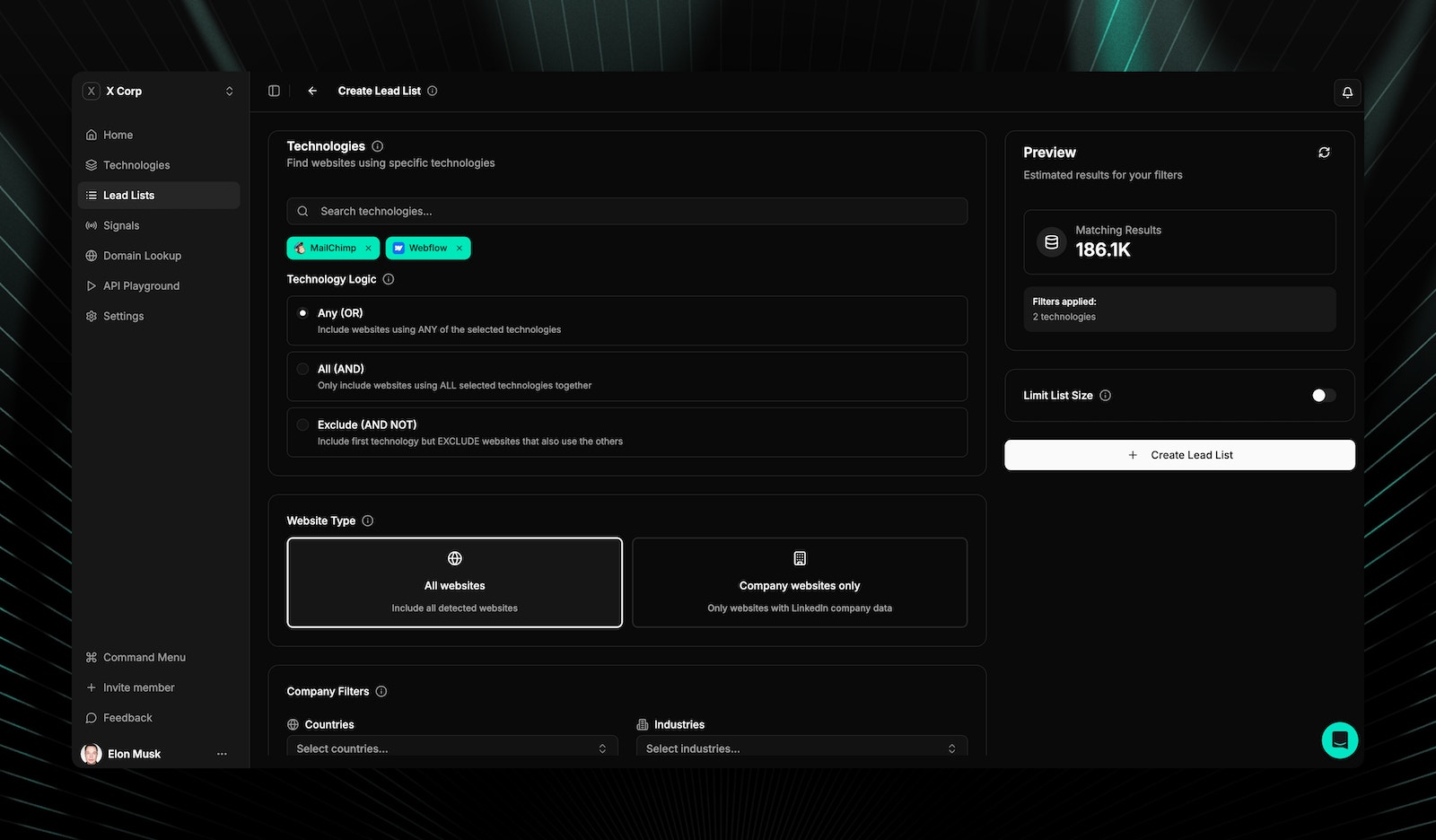
Build custom lead lists with multi-dimensional filtering.- Technology filters
- Company filters
- Keyword filters
List size options
What data columns are included
Each lead list can include up to 14 data fields:View all 14 data columns
View all 14 data columns
Workflow
1
Configure filters
Set technology, keyword, geography, and company filters to define your target audience.
2
Preview
See the estimated count and credit cost before creating the list.
3
Name and create
Give the list a name and submit. Processing happens asynchronously.
4
Download
Export when ready in CSV or JSON format.
List statuses
Preview and export
- Preview table — First 20-50 results with all configured columns
- Export formats — CSV and JSON
- Technology resolution — Technology IDs are resolved to human-readable names
- Sorting and search — Filter and sort within preview results
- Custom audience format — Export contacts formatted for LinkedIn Matched Audiences, Facebook Custom Audiences, and Google Customer Match
Custom audience exports
Export verified email lists from any lead list directly into ad platforms for technology-based audience targeting:- LinkedIn Matched Audiences: Upload technology-segmented professional contacts
- Facebook Custom Audiences: Role + technology targeting at scale
- Google Customer Match: Technology-qualified contacts for Search and Display
- Suppression lists: Exclude companies already using your technology from ad spend
- Dynamic refresh: Re-export as subscriber/churn signals update the data
Related pages
Domain lookup
Scan any website to see its full technology stack.
Use cases
Sales workflows and lead generation strategies.
Company data API
Firmographic enrichment and company search via API.
Credits
Understand credit costs for list generation.
Frequently asked questions
What is the maximum lead list size?
What is the maximum lead list size?
You can generate lists up to 100,000 leads in a single request. Available sizes are 1,000, 5,000, 10,000, 25,000, 50,000, and 100,000. Start with a smaller list to validate your filters before scaling up.
What export formats are available?
What export formats are available?
Lead lists can be exported as CSV or JSON. Both formats include all data columns you selected when creating the list. Technology IDs are automatically resolved to human-readable names in the export.
How do AND, OR, and AND NOT filters work?
How do AND, OR, and AND NOT filters work?
OR returns domains using any of the selected technologies. AND returns only domains using all selected technologies. AND NOT excludes domains using the specified technology. For example, “Uses Mailchimp AND NOT HubSpot” finds Mailchimp users who don’t also use HubSpot.
How long does list generation take?
How long does list generation take?
Lists are generated asynchronously. Small lists (1,000-5,000) typically complete in seconds. Larger lists (50,000-100,000) are queued and may take a few minutes. You’ll see a “Processing” status until the list is ready for download.