> ## Documentation Index
> Fetch the complete documentation index at: https://technologychecker.io/docs/llms.txt
> Use this file to discover all available pages before exploring further.
# Real-Time Technology Buying Signals
> Real-time subscriber and churn signals when companies adopt, remove, or switch technologies. Includes replacement detection, signal confidence scoring, verified decision-maker contacts, and custom audience exports. Delivered via email, Slack, webhooks, or CRM.
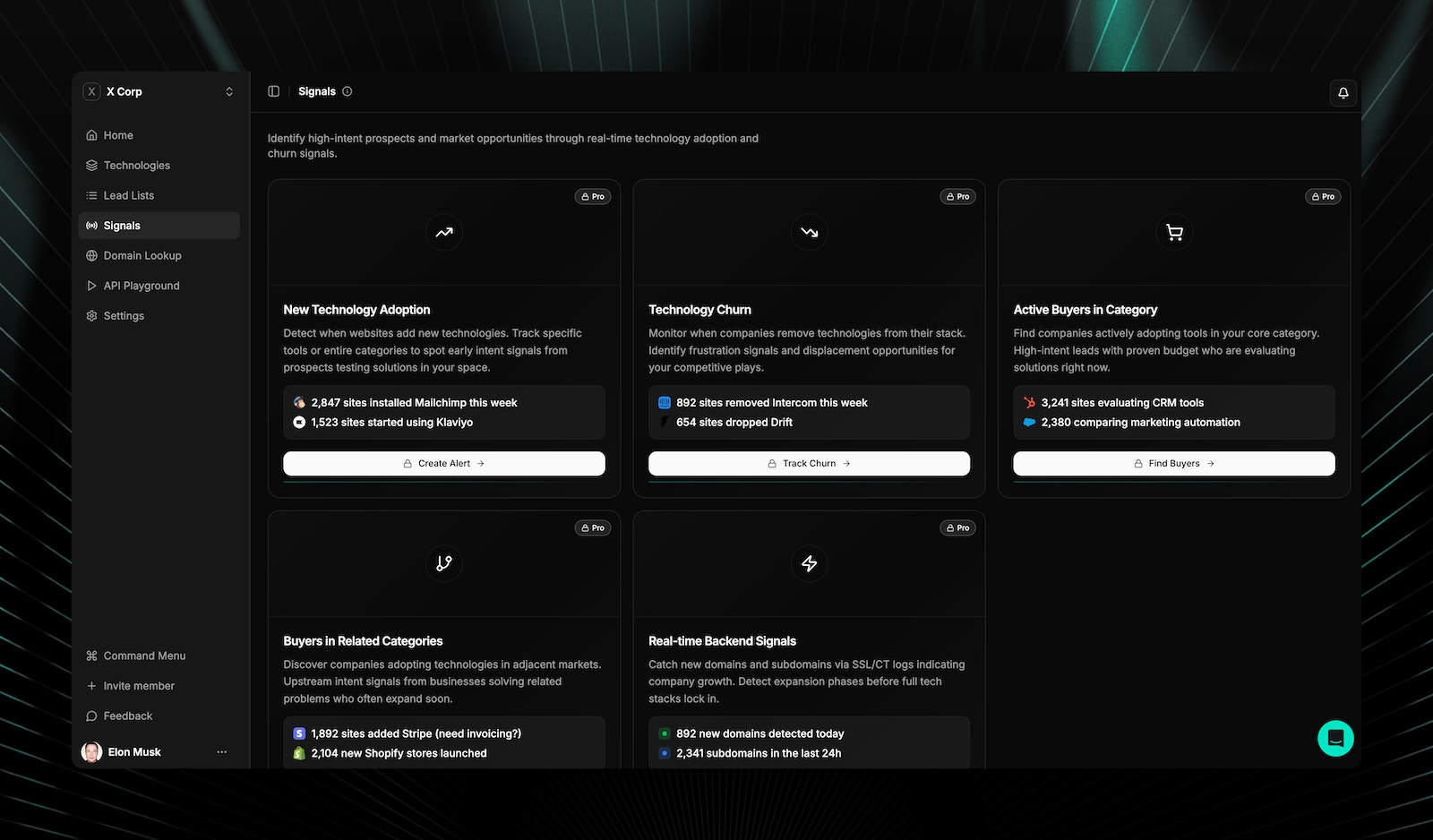
Signals monitors real-time technology changes across 50M+ domains. When a company subscribes to, drops, or switches technologies, that change becomes an actionable buying signal delivered with verified decision-maker contacts. Your team can act on it right away.
 ## Signal types
TechnologyChecker tracks six types of signals:
Detect when companies start using a technology, including backend tools and standalone platforms that browser-based tools miss.
* Real-time adoption detection across 50M+ domains
* Timestamp of first detection
* Signal confidence scoring
* Trend analysis: is this technology gaining or losing market share?
*Example: "Alert me when prospects adopt Stripe" — identifies companies investing in payment infrastructure.*
**Use case:** Sell complementary products to companies actively building their stack.
Detect when companies stop using a technology. Identify frustration signals and displacement opportunities before competitors notice.
* Real-time removal detection
* Estimated removal date
* Churn pattern analysis using historical data
* Early warning indicators before full removal
*Example: "Alert me when companies drop Intercom." Identifies companies actively seeking alternatives during the 30-60 day evaluation window.*
**Use case:** Reach out with your alternative while the prospect is evaluating options.
See what companies switched to after dropping a technology. Competitive displacement, in real time.
* Automatic detection of replacement technology
* Migration pattern matching against historical data
* Competitive positioning insights
*Example: "Alert me when companies switch from Intercom to Zendesk." You'll see competitive movements as they happen.*
**Use case:** Intervene during active technology evaluations or target companies switching to a tool you integrate with.
Track when prospects adopt your competitors' tools and intervene during the evaluation window.
*Example: "Alert me when target accounts adopt Marketo." Engage before they fully commit.*
**Use case:** Competitive selling with technology context and verified contacts for decision-makers.
Monitor your existing customers for signs they're evaluating competitors. Proactive retention outreach based on real signals.
*Example: "Alert me when my customers add BambooHR." Catch at-risk accounts before renewal.*
**Use case:** Customer success teams can address migration concerns before renewal conversations.
Detect when companies adopt backend tools (n8n, databases) and standalone platforms (Airtable, Notion) that signal operational changes.
*Example: "Prospect adopted n8n + Airtable." They're building custom workflows. Strong buying signal.*
**Use case:** Identify companies building operations infrastructure who need your platform.
## Signal confidence scoring
Every signal includes a confidence score so you can prioritize high-certainty detections:
| Signal source | Confidence level | Description |
| ------------------------ | ---------------- | ------------------------------------ |
| DNS-based detection | High (95%+) | CNAME, NS, MX record changes |
| SSL certificate-based | High (95%+) | Certificate transparency log changes |
| HTTP header-based | High (85%+) | Server headers, response signatures |
| Code-based detection | Medium (70-85%) | JavaScript, HTML pattern changes |
| Infrastructure inference | Medium (60-80%) | IP, ASN, CDN fingerprint changes |
When building automated workflows, filter on confidence score to focus on the highest-certainty signals. Scores above 80 indicate detection backed by multiple independent signal sources.
## Alert delivery
| Channel | Description |
| ------------- | -------------------------------------------------------------------- |
| Email | Instant notification with technology change details and contact data |
| Slack / Teams | Direct delivery to your team's channels |
| Webhooks | Trigger custom workflows and automation |
| CRM tasks | Automatic task creation in Salesforce, HubSpot, or Pipedrive |
| API callbacks | Programmatic integration with your internal tools |
## Alert customization
| Setting | Description |
| -------------------- | ------------------------------------------------------------------- |
| Target technologies | Monitor specific technologies or entire categories |
| Company filters | Filter by size, industry, geography |
| Confidence threshold | Set minimum confidence score for alerts |
| Signal type | Subscribe to specific signal types (subscriber, churn, replacement) |
| Custom rules | Define custom alert logic combining multiple conditions |
## What's included in every alert
Every signal includes the context your team needs to act:
* **Technology change details:** What was subscribed, dropped, or switched (with timestamps)
* **Signal confidence score:** How reliable the detection is
* **Verified decision-maker contacts:** Emails for the right person to reach
* **Company firmographics:** Size, industry, location, and LinkedIn data
* **Historical context:** How common is this change? What typically follows?
* **Recommended action:** Suggested outreach angle based on the signal type
## Custom audience integration
Export signal-matched contacts directly into ad platforms for timely targeting:
* Companies that just subscribed to a technology: reach them during onboarding
* Companies that just dropped a competitor: reach them during evaluation
* At-risk customers adopting competitor tools: targeted retention ads
Exports formatted for LinkedIn Matched Audiences, Facebook Custom Audiences, and Google Customer Match.
Want to learn more about Signals? Contact [support@TechnologyChecker.io](mailto:support@TechnologyChecker.io) for details.
## Related pages
Scan any website to see its full technology stack.
Build targeted prospect lists with technology and company filters.
Churn prevention and buying window detection workflows.
Real-time signals and how they compare to alternatives.
## Signal types
TechnologyChecker tracks six types of signals:
Detect when companies start using a technology, including backend tools and standalone platforms that browser-based tools miss.
* Real-time adoption detection across 50M+ domains
* Timestamp of first detection
* Signal confidence scoring
* Trend analysis: is this technology gaining or losing market share?
*Example: "Alert me when prospects adopt Stripe" — identifies companies investing in payment infrastructure.*
**Use case:** Sell complementary products to companies actively building their stack.
Detect when companies stop using a technology. Identify frustration signals and displacement opportunities before competitors notice.
* Real-time removal detection
* Estimated removal date
* Churn pattern analysis using historical data
* Early warning indicators before full removal
*Example: "Alert me when companies drop Intercom." Identifies companies actively seeking alternatives during the 30-60 day evaluation window.*
**Use case:** Reach out with your alternative while the prospect is evaluating options.
See what companies switched to after dropping a technology. Competitive displacement, in real time.
* Automatic detection of replacement technology
* Migration pattern matching against historical data
* Competitive positioning insights
*Example: "Alert me when companies switch from Intercom to Zendesk." You'll see competitive movements as they happen.*
**Use case:** Intervene during active technology evaluations or target companies switching to a tool you integrate with.
Track when prospects adopt your competitors' tools and intervene during the evaluation window.
*Example: "Alert me when target accounts adopt Marketo." Engage before they fully commit.*
**Use case:** Competitive selling with technology context and verified contacts for decision-makers.
Monitor your existing customers for signs they're evaluating competitors. Proactive retention outreach based on real signals.
*Example: "Alert me when my customers add BambooHR." Catch at-risk accounts before renewal.*
**Use case:** Customer success teams can address migration concerns before renewal conversations.
Detect when companies adopt backend tools (n8n, databases) and standalone platforms (Airtable, Notion) that signal operational changes.
*Example: "Prospect adopted n8n + Airtable." They're building custom workflows. Strong buying signal.*
**Use case:** Identify companies building operations infrastructure who need your platform.
## Signal confidence scoring
Every signal includes a confidence score so you can prioritize high-certainty detections:
| Signal source | Confidence level | Description |
| ------------------------ | ---------------- | ------------------------------------ |
| DNS-based detection | High (95%+) | CNAME, NS, MX record changes |
| SSL certificate-based | High (95%+) | Certificate transparency log changes |
| HTTP header-based | High (85%+) | Server headers, response signatures |
| Code-based detection | Medium (70-85%) | JavaScript, HTML pattern changes |
| Infrastructure inference | Medium (60-80%) | IP, ASN, CDN fingerprint changes |
When building automated workflows, filter on confidence score to focus on the highest-certainty signals. Scores above 80 indicate detection backed by multiple independent signal sources.
## Alert delivery
| Channel | Description |
| ------------- | -------------------------------------------------------------------- |
| Email | Instant notification with technology change details and contact data |
| Slack / Teams | Direct delivery to your team's channels |
| Webhooks | Trigger custom workflows and automation |
| CRM tasks | Automatic task creation in Salesforce, HubSpot, or Pipedrive |
| API callbacks | Programmatic integration with your internal tools |
## Alert customization
| Setting | Description |
| -------------------- | ------------------------------------------------------------------- |
| Target technologies | Monitor specific technologies or entire categories |
| Company filters | Filter by size, industry, geography |
| Confidence threshold | Set minimum confidence score for alerts |
| Signal type | Subscribe to specific signal types (subscriber, churn, replacement) |
| Custom rules | Define custom alert logic combining multiple conditions |
## What's included in every alert
Every signal includes the context your team needs to act:
* **Technology change details:** What was subscribed, dropped, or switched (with timestamps)
* **Signal confidence score:** How reliable the detection is
* **Verified decision-maker contacts:** Emails for the right person to reach
* **Company firmographics:** Size, industry, location, and LinkedIn data
* **Historical context:** How common is this change? What typically follows?
* **Recommended action:** Suggested outreach angle based on the signal type
## Custom audience integration
Export signal-matched contacts directly into ad platforms for timely targeting:
* Companies that just subscribed to a technology: reach them during onboarding
* Companies that just dropped a competitor: reach them during evaluation
* At-risk customers adopting competitor tools: targeted retention ads
Exports formatted for LinkedIn Matched Audiences, Facebook Custom Audiences, and Google Customer Match.
Want to learn more about Signals? Contact [support@TechnologyChecker.io](mailto:support@TechnologyChecker.io) for details.
## Related pages
Scan any website to see its full technology stack.
Build targeted prospect lists with technology and company filters.
Churn prevention and buying window detection workflows.
Real-time signals and how they compare to alternatives.