> ## Documentation Index
> Fetch the complete documentation index at: https://technologychecker.io/docs/llms.txt
> Use this file to discover all available pages before exploring further.
# Targeted B2B Lead Lists by Integrating Technology Detection
> Build targeted B2B prospect lists by combining technology detection with LinkedIn firmographic filters. Export up to 100,000 leads with verified contacts as CSV or JSON. Create custom audiences for LinkedIn, Facebook, and Google Ads.
Create targeted lists of companies and websites by combining technology detection with LinkedIn firmographic data and verified decision-maker contacts. Lead lists are built for sales prospecting, competitive displacement, account-based marketing, and custom audience ad targeting.
 ## Prerequisites
Before building a lead list, make sure you have:
* A TechnologyChecker account ([sign up free](https://app.technologychecker.io/auth/sign-up))
* An organization API key (create one in **Settings** > **Developers** — see [authentication](/api-reference/authentication#how-to-get-your-api-key))
* Sufficient [credits](/api-reference/credits) for the requested list size
## How to build a lead list
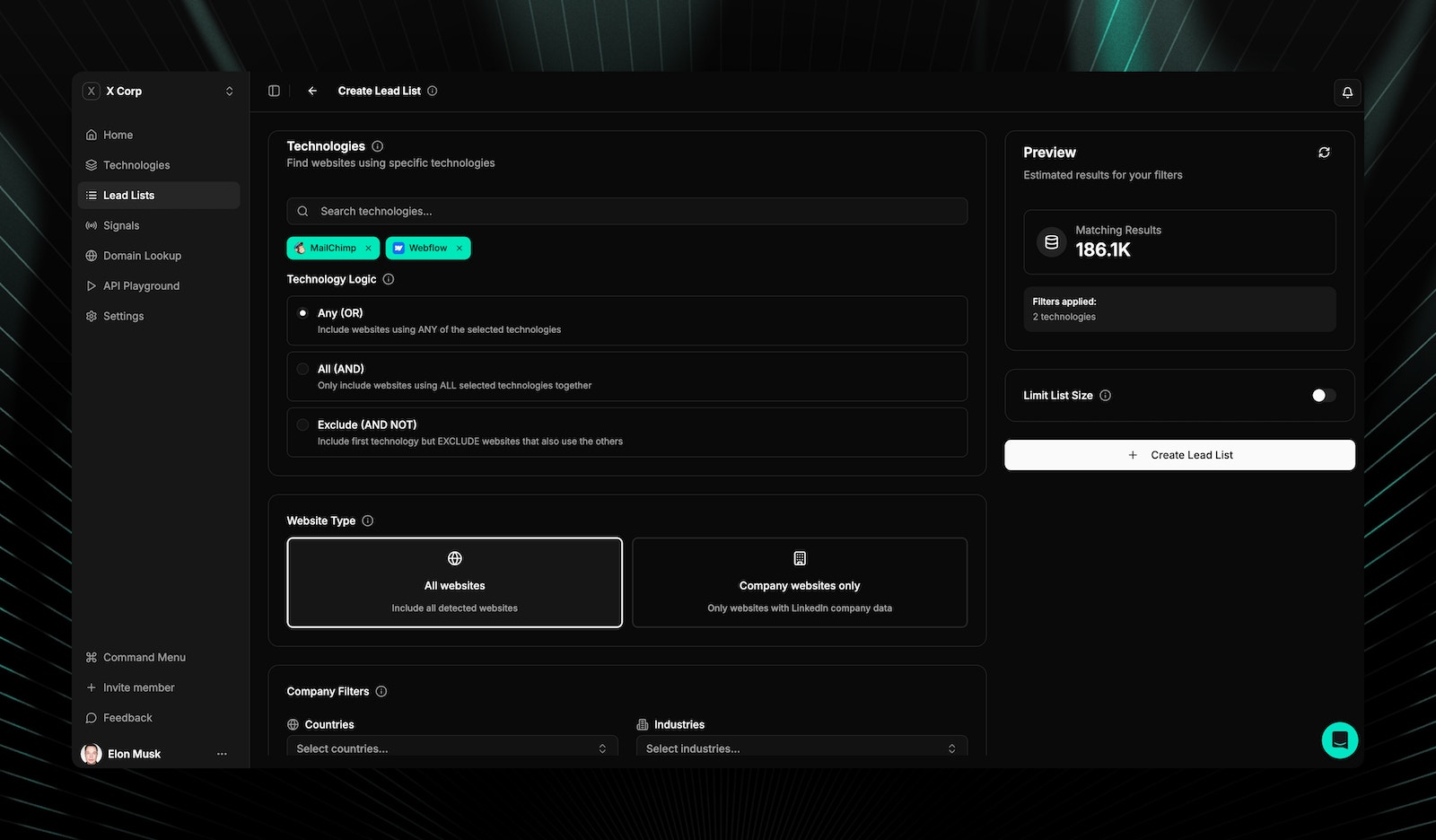
Build custom lead lists with multi-dimensional filtering.
| Feature | Description |
| --------------- | -------------------------------------------- |
| Multi-select | Choose multiple technologies to filter by |
| Autocomplete | Real-time search as you type |
| Logic operators | OR (any of), AND (all of), AND NOT (exclude) |
| Icons | Technology logos shown in selection |
Use **AND NOT** to exclude websites using a competitor's product. For example: "Uses Mailchimp AND NOT HubSpot" finds Mailchimp users you could convert.
Filter by LinkedIn firmographic data:
| Filter | Options |
| -------------- | --------------------------------------------------------------------- |
| Industries | Multi-select from 96 LinkedIn industries |
| Employee count | 1-10, 11-50, 51-200, 201-500, 501-1000, 1001-5000, 5001-10000, 10001+ |
| Geography | Multi-select from 195 countries |
| Website type | All websites or company websites only |
* **Include keywords** — Array of keywords that must appear on the website
* **Exclude keywords** — Array of keywords to exclude from results
## List size options
| Size | Description |
| ------- | ------------------- |
| 1,000 | Small targeted list |
| 5,000 | Medium list |
| 10,000 | Large list |
| 25,000 | Enterprise list |
| 50,000 | Bulk list |
| 100,000 | Maximum list |
## What data columns are included
Each lead list can include up to 14 data fields:
| Column | Required | Description |
| ------------------ | -------- | ------------------------------ |
| Domain | Yes | Website domain |
| Detection URL | No | URL where technology was found |
| Technologies | No | Detected technologies list |
| Company name | No | Business name from LinkedIn |
| LinkedIn URL | No | Company LinkedIn profile URL |
| Industry | No | LinkedIn industry category |
| Industry code | No | Standard industry code |
| Country | No | Country of headquarters |
| City | No | City location |
| State | No | State/province |
| Founded year | No | Year founded |
| Employees | No | Employee count range |
| Company type | No | Business type classification |
| Associated members | No | Count of associated people |
## Workflow
Set technology, keyword, geography, and company filters to define your target audience.
See the estimated count and credit cost before creating the list.
Give the list a name and submit. Processing happens asynchronously.
Export when ready in CSV or JSON format.
## List statuses
| Status | Description |
| ---------- | ---------------------------------- |
| Processing | List is being generated |
| Ready | Available for preview and download |
| Failed | Error occurred during generation |
| Expired | Past the expiration date |
## Preview and export
* **Preview table** — First 20-50 results with all configured columns
* **Export formats** — CSV and JSON
* **Technology resolution** — Technology IDs are resolved to human-readable names
* **Sorting and search** — Filter and sort within preview results
* **Custom audience format** — Export contacts formatted for LinkedIn Matched Audiences, Facebook Custom Audiences, and Google Customer Match
## Custom audience exports
Export verified email lists from any lead list directly into ad platforms for technology-based audience targeting:
* **LinkedIn Matched Audiences:** Upload technology-segmented professional contacts
* **Facebook Custom Audiences:** Role + technology targeting at scale
* **Google Customer Match:** Technology-qualified contacts for Search and Display
* **Suppression lists:** Exclude companies already using your technology from ad spend
* **Dynamic refresh:** Re-export as subscriber/churn signals update the data
*Example: Export all "VP Operations" contacts at companies using Airtable, filtered to US companies with 50-500 employees — upload to LinkedIn as a Matched Audience for targeted ABM campaigns.*
Start with a smaller list (1,000) to validate your filters before generating a large export. This saves [credits](/api-reference/credits#how-much-does-each-endpoint-cost) and helps you refine your targeting.
## Related pages
Scan any website to see its full technology stack.
Sales workflows and lead generation strategies.
Firmographic enrichment and company search via API.
Understand credit costs for list generation.
## Frequently asked questions
You can generate lists up to 100,000 leads in a single request. Available sizes are 1,000, 5,000, 10,000, 25,000, 50,000, and 100,000. Start with a smaller list to validate your filters before scaling up.
Lead lists can be exported as CSV or JSON. Both formats include all data columns you selected when creating the list. Technology IDs are automatically resolved to human-readable names in the export.
**OR** returns domains using any of the selected technologies. **AND** returns only domains using all selected technologies. **AND NOT** excludes domains using the specified technology. For example, "Uses Mailchimp AND NOT HubSpot" finds Mailchimp users who don't also use HubSpot.
Lists are generated asynchronously. Small lists (1,000-5,000) typically complete in seconds. Larger lists (50,000-100,000) are queued and may take a few minutes. You'll see a "Processing" status until the list is ready for download.
## Prerequisites
Before building a lead list, make sure you have:
* A TechnologyChecker account ([sign up free](https://app.technologychecker.io/auth/sign-up))
* An organization API key (create one in **Settings** > **Developers** — see [authentication](/api-reference/authentication#how-to-get-your-api-key))
* Sufficient [credits](/api-reference/credits) for the requested list size
## How to build a lead list
Build custom lead lists with multi-dimensional filtering.
| Feature | Description |
| --------------- | -------------------------------------------- |
| Multi-select | Choose multiple technologies to filter by |
| Autocomplete | Real-time search as you type |
| Logic operators | OR (any of), AND (all of), AND NOT (exclude) |
| Icons | Technology logos shown in selection |
Use **AND NOT** to exclude websites using a competitor's product. For example: "Uses Mailchimp AND NOT HubSpot" finds Mailchimp users you could convert.
Filter by LinkedIn firmographic data:
| Filter | Options |
| -------------- | --------------------------------------------------------------------- |
| Industries | Multi-select from 96 LinkedIn industries |
| Employee count | 1-10, 11-50, 51-200, 201-500, 501-1000, 1001-5000, 5001-10000, 10001+ |
| Geography | Multi-select from 195 countries |
| Website type | All websites or company websites only |
* **Include keywords** — Array of keywords that must appear on the website
* **Exclude keywords** — Array of keywords to exclude from results
## List size options
| Size | Description |
| ------- | ------------------- |
| 1,000 | Small targeted list |
| 5,000 | Medium list |
| 10,000 | Large list |
| 25,000 | Enterprise list |
| 50,000 | Bulk list |
| 100,000 | Maximum list |
## What data columns are included
Each lead list can include up to 14 data fields:
| Column | Required | Description |
| ------------------ | -------- | ------------------------------ |
| Domain | Yes | Website domain |
| Detection URL | No | URL where technology was found |
| Technologies | No | Detected technologies list |
| Company name | No | Business name from LinkedIn |
| LinkedIn URL | No | Company LinkedIn profile URL |
| Industry | No | LinkedIn industry category |
| Industry code | No | Standard industry code |
| Country | No | Country of headquarters |
| City | No | City location |
| State | No | State/province |
| Founded year | No | Year founded |
| Employees | No | Employee count range |
| Company type | No | Business type classification |
| Associated members | No | Count of associated people |
## Workflow
Set technology, keyword, geography, and company filters to define your target audience.
See the estimated count and credit cost before creating the list.
Give the list a name and submit. Processing happens asynchronously.
Export when ready in CSV or JSON format.
## List statuses
| Status | Description |
| ---------- | ---------------------------------- |
| Processing | List is being generated |
| Ready | Available for preview and download |
| Failed | Error occurred during generation |
| Expired | Past the expiration date |
## Preview and export
* **Preview table** — First 20-50 results with all configured columns
* **Export formats** — CSV and JSON
* **Technology resolution** — Technology IDs are resolved to human-readable names
* **Sorting and search** — Filter and sort within preview results
* **Custom audience format** — Export contacts formatted for LinkedIn Matched Audiences, Facebook Custom Audiences, and Google Customer Match
## Custom audience exports
Export verified email lists from any lead list directly into ad platforms for technology-based audience targeting:
* **LinkedIn Matched Audiences:** Upload technology-segmented professional contacts
* **Facebook Custom Audiences:** Role + technology targeting at scale
* **Google Customer Match:** Technology-qualified contacts for Search and Display
* **Suppression lists:** Exclude companies already using your technology from ad spend
* **Dynamic refresh:** Re-export as subscriber/churn signals update the data
*Example: Export all "VP Operations" contacts at companies using Airtable, filtered to US companies with 50-500 employees — upload to LinkedIn as a Matched Audience for targeted ABM campaigns.*
Start with a smaller list (1,000) to validate your filters before generating a large export. This saves [credits](/api-reference/credits#how-much-does-each-endpoint-cost) and helps you refine your targeting.
## Related pages
Scan any website to see its full technology stack.
Sales workflows and lead generation strategies.
Firmographic enrichment and company search via API.
Understand credit costs for list generation.
## Frequently asked questions
You can generate lists up to 100,000 leads in a single request. Available sizes are 1,000, 5,000, 10,000, 25,000, 50,000, and 100,000. Start with a smaller list to validate your filters before scaling up.
Lead lists can be exported as CSV or JSON. Both formats include all data columns you selected when creating the list. Technology IDs are automatically resolved to human-readable names in the export.
**OR** returns domains using any of the selected technologies. **AND** returns only domains using all selected technologies. **AND NOT** excludes domains using the specified technology. For example, "Uses Mailchimp AND NOT HubSpot" finds Mailchimp users who don't also use HubSpot.
Lists are generated asynchronously. Small lists (1,000-5,000) typically complete in seconds. Larger lists (50,000-100,000) are queued and may take a few minutes. You'll see a "Processing" status until the list is ready for download.